When you’ve invested in a Raspberry Pi, protecting your £25-35 board with a quality case is simply common sense. The SB Components Premium Black Case promises elegant protection with full port accessibility for the Raspberry Pi 3 B+, 3, and 2B models. At around £5-8, it positions itself as an affordable, no-frills protective solution. But does this injection-molded ABS enclosure deliver sufficient protection and ease of use, or should you spend a bit more on alternatives? Let’s find out.
Key Specifications
Compatibility:
- Raspberry Pi 3 Model B+
- Raspberry Pi 3 Model B
- Raspberry Pi 2 Model B
Design & Construction:
- Material: Two-piece injection-molded ABS plastic
- Mounting: Snap-fit design (no tools required)
- Color: Jet Black (matte finish)
- Screw Mounting: 4 optional mounting holes (screws not included)
- Weight: Approximately 45g
- Dimensions: Designed to credit-card Pi form factor
Features:
- Full access to all consumer ports
- DSI (Display Serial Interface) access
- Camera connector access
- GPIO header access (open top design)
- Wall mountable
- Anti-slip feet (prevents sliding on surfaces)
- Ventilation cutouts on sides
Price: £5-8 (depending on retailer and promotions)
Design and Build Quality
Construction
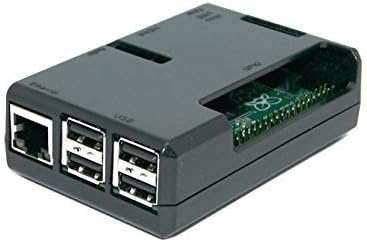
The SB Components case is a two-piece injection-molded ABS enclosure that incorporates snap-fit mounting points to hold the Pi securely in place. The black matte finish gives it a professional, understated appearance that won’t look out of place on a desk or in a media center setup.
The ABS plastic construction feels solid and durable. Customer feedback confirms the case is made of solid plastic and snaps together tightly, providing confidence that your Pi will be well-protected from accidental knocks, dust, and minor impacts.
Fit and Finish
One of the most impressive aspects of this budget case is its precision engineering. The fit is excellent, with all ports on the Pi 2 B+ available including the microSD slot. Users report that cutouts for the Pi’s ports fit perfectly, which is crucial for a protective case—poorly aligned cutouts can make connecting cables frustrating or even impossible.
The snap-fit assembly requires moderate pressure to close but isn’t overly difficult. Once assembled, the two halves stay securely together without any worrying creaking or flexing.
Port Accessibility
This is where the SB Components case truly excels. The case provides access to all RPi consumer ports and DSI, camera and GPIO connectors, meaning you won’t need to compromise on functionality for protection.
Specifically accessible:
- Power: Micro USB port fully exposed
- Video: HDMI port with generous clearance
- USB: All four USB 2.0 ports easily accessible
- Ethernet: RJ45 port with ample space for cable insertion
- Audio: 3.5mm jack unobstructed
- GPIO: Open-top design provides full access to 40-pin header
- Storage: MicroSD card slot accessible (important for swapping cards)
- Camera/Display: CSI and DSI ribbon cable connectors accessible
This comprehensive port access means you can use the case for virtually any project without modification.
Assembly and Installation
The Assembly Process
Installing your Raspberry Pi into the SB Components case is straightforward:
- Open the case: Separate the two halves
- Position the Pi: Place your Raspberry Pi into the bottom half, aligning the mounting posts
- Secure the board: The Pi snaps into place with the mounting posts fitting through the board’s mounting holes
- Close the case: Align the top half and press down until it clicks into place
There’s moderate pressure required to fit the board in the case and then fit the cover, but it’s not a problem to fit or remove afterwards. The entire process takes about 2-3 minutes, even for first-time users.
Optional Screw Mounting
The case features four screw holes to screw the board to the case if preferred, though screws are not provided and not essential. For most users, the snap-fit design provides adequate security. However, if you’re building a project that will experience vibration or movement (such as a robot or portable device), adding screws (M2.5 x 6mm) provides extra peace of mind.
Disassembly
Removing the Pi from the case is equally simple. The halves separate with modest force, and the board lifts out cleanly. This makes it easy to access the GPIO pins, swap SD cards, or troubleshoot connections.
Thermal Performance
Cooling Considerations
The SB Components case features ventilation cutouts along the sides and a fully open top (for GPIO access), which provides some airflow. However, it’s important to understand the thermal limitations:
- Light use: For basic tasks, web browsing, and simple projects, thermal performance is adequate
- Moderate use: Running intensive applications may cause the Pi 3 to reach 70-75°C
- Heavy use: Extended 4K video encoding or gaming can push temperatures toward thermal throttling (82°C+)
Recommendation: For typical educational projects, home automation, and light computing, the case’s passive cooling is sufficient. For sustained high-performance tasks, consider adding small aluminum heatsinks to the Pi’s chips before installing in the case. The open-top design makes this easy to do.
No Active Cooling
Unlike some premium cases, the SB Components case doesn’t include provisions for fan mounting. This keeps costs down and noise to zero, but limits sustained performance for demanding applications.
Practical Usage Scenarios
Perfect For:
Educational Projects
- Learning programming (Python, Scratch)
- Classroom demonstrations
- Student electronics projects
- STEM activities
Home Automation
- Home Assistant server
- Smart home controller
- Network monitoring
- Pi-hole ad blocker
Media Applications
- Kodi/LibreELEC media center (light-to-moderate use)
- Music streaming server
- Digital photo frame
- Retro gaming (8-bit and 16-bit emulation)
Development and Testing
- Web server testing
- Programming practice
- IoT prototyping
- Network tools
Less Ideal For:
- Intensive computing tasks requiring active cooling
- 4K media encoding (thermal limitations)
- Projects requiring HAT boards (open top prevents stacking closed cases)
- Outdoor permanent installations (weatherproofing not specified)
- Projects needing GPIO protection (open-top design leaves pins exposed)
Pros and Cons
Advantages
✅ Excellent value – £5-8 for solid protection
✅ Perfect port alignment – All cutouts precisely positioned
✅ Universal port access – HDMI, USB, Ethernet, audio, GPIO, camera, display all accessible
✅ Easy assembly – Tool-free snap-fit design takes minutes
✅ Solid construction – Quality ABS plastic feels durable
✅ MicroSD access – Easy card swapping without disassembly
✅ Wall mountable – Mounting holes for permanent installations
✅ Anti-slip feet – Keeps Pi stable on surfaces
✅ No tools required – Complete assembly without screwdriver
✅ Compatible with multiple models – Works with Pi 3 B+, 3, and 2B
Disadvantages
❌ No active cooling – Can’t mount fans for high-performance tasks
❌ Limited thermal management – Passive cooling only
❌ Open top design – GPIO pins exposed to dust and accidental shorts
❌ No HAT support – Can’t accommodate expansion boards
❌ No LED visibility – Power and activity LEDs not visible externally
❌ Screws not included – Optional screw mounting requires purchasing fasteners separately
❌ Basic aesthetics – Functional but plain appearance
❌ No cable management – No clips or guides for tidy cabling
❌ Not weatherproof – Indoor use only
Comparison with Alternatives
vs. Official Raspberry Pi Case (£6-10)
Official Case Advantages:
- Modular design with removable panels
- Better aesthetic finish
- LED light pipes for status visibility
- HAT-compatible with removable lid
SB Components Advantages:
- Lower price
- Slightly easier assembly
- Better ventilation (fully open top)
Verdict: The official case is worth £2-3 extra if you value aesthetics and modularity
vs. Flirc Aluminum Case (£15-20)
Flirc Advantages:
- Entire case acts as heatsink
- Excellent passive cooling
- Premium build quality
- Sleek aluminum design
SB Components Advantages:
- 60-70% lower price
- Lighter weight
- Easier GPIO access
Verdict: Flirc is better for demanding tasks; SB Components is perfect for budget-conscious users
vs. Generic Clear Acrylic Cases (£3-5)
Acrylic Advantages:
- See-through design shows Pi internals
- Slightly cheaper
- Good airflow
SB Components Advantages:
- More durable material
- Better protection
- More professional appearance
- Superior snap-fit design
Verdict: SB Components offers better protection for minimal extra cost
Long-Term Durability
Based on customer feedback and user experiences, the SB Components case demonstrates good long-term reliability:
- Snap-fit durability: The case can be assembled and disassembled multiple times without loosening
- Material stability: ABS plastic doesn’t yellow or become brittle over time like cheaper plastics
- Port integrity: Cutouts maintain their shape and don’t widen with repeated cable insertions
- Structural integrity: The case continues to protect the Pi even after years of use
Users report the case maintains its tight snap fit and solid construction over extended periods, making it a reliable long-term protection solution.
Value Proposition
At £5-8, the SB Components Premium Black Case represents outstanding value for money. To put this in perspective:
- Official Raspberry Pi case: £6-10 (20-25% more expensive)
- Premium aluminum cases: £15-25 (200-400% more expensive)
- The Pi itself: £25-35 (case costs just 15-25% of board price)
You’re getting quality protection for your investment without breaking the bank. The precision engineering, solid construction, and comprehensive port access rival cases costing 2-3 times more.
Who Should Buy This Case?
Ideal For:
- Students and educators protecting classroom Pi boards
- Hobbyists building GPIO-based projects
- Budget-conscious makers wanting reliable protection
- First-time Pi users who need simple, effective enclosure
- Anyone with Pi 3 B+, 3, or 2B seeking affordable protection
- Projects requiring frequent GPIO access due to open-top design
Consider Alternatives If:
- You need active cooling for intensive tasks
- You want premium aesthetics and build quality
- You’re using HAT expansion boards
- You need weatherproof protection for outdoor use
- You want LED status visibility
- You prefer fully enclosed designs with GPIO protection
Final Verdict
Rating: 4/5 Stars ⭐⭐⭐⭐
The SB Components Premium Black Case is a solid, sensible choice for Raspberry Pi protection. It nails the fundamentals: quality construction, perfect port alignment, easy assembly, and affordable pricing. While it doesn’t offer premium features like active cooling, LED visibility, or modular design, it doesn’t claim to—and that’s perfectly fine.
This case delivers what users want: good build quality with all ports easily accessible, made of solid plastic that snaps together tightly. For the vast majority of Raspberry Pi projects—educational use, home automation, light computing, and GPIO-based making—this case provides exactly the right level of protection without unnecessary complexity or cost.
The open-top design is both a blessing and a limitation. It provides unparalleled GPIO access for hardware projects but leaves pins exposed to dust and potential shorts. If your project involves GPIO connections, this is ideal. If you want fully enclosed protection, look elsewhere.
At £5-8, you’d be hard-pressed to find better value. The precision engineering and solid construction rival cases costing significantly more. It’s not the flashiest or feature-richest option, but it’s reliable, practical, and affordable—three qualities that matter most to the typical Raspberry Pi user.
Bottom Line: A well-executed, budget-friendly case that does exactly what it promises. Perfect for most users, especially those working with GPIO projects or on a tight budget.
Bottom Line
Best for: GPIO projects, budget-conscious users, students, light-duty applications
Skip if: You need active cooling, HAT support, or premium aesthetics
Price: £5-8 (excellent value)
Our Verdict: Simple, solid protection at an unbeatable price
Buy on Amazon : https://amzn.to/3IUBSyv
Protecting your Raspberry Pi doesn’t have to be expensive. Have you used the SB Components case? Share your experience in the comments!