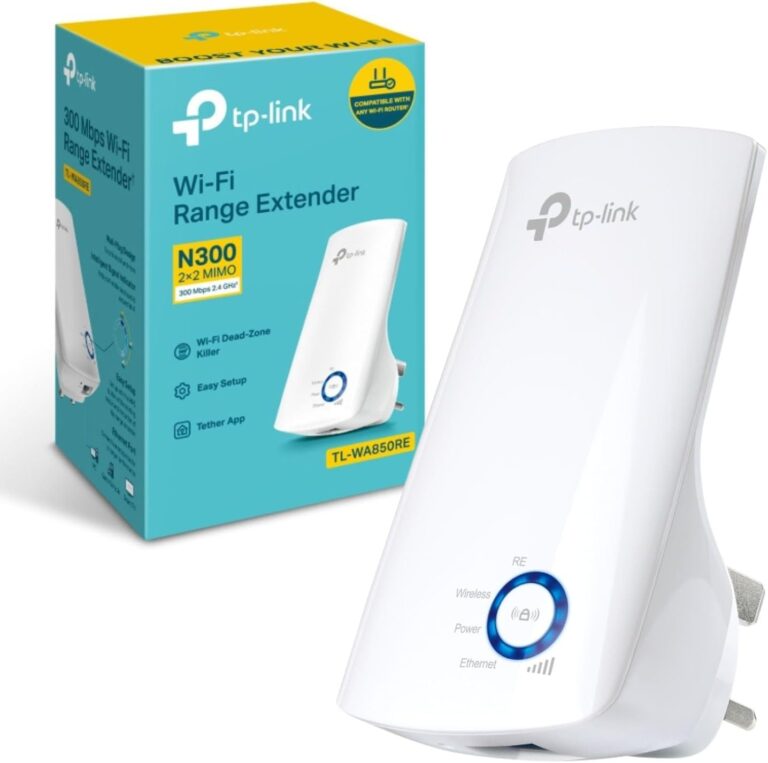
The TP-Link TL-WA850RE is a compact wall-plug WiFi extender that eliminates dead zones in large homes for around £15-20. Users consistently praise its straightforward setup process—many reporting successful installation in just minutes using the WPS button—and its ability to transform weak signals into strong, stable connections for streaming and browsing. One customer increased download speeds from 3.04 Mbps to 22.9 Mbps after installation. However, the extender drops connections every 30 minutes or so, though devices quickly re-establish signals, and speeds in extended areas typically reach about half the router’s original speed. At this price point, it’s an excellent entry-level solution for basic coverage expansion, but don’t expect premium reliability or full-speed performance.
Rating: 3.5/5 Stars ⭐⭐⭐☆
Performance and Usability
Setup requires minimal technical knowledge—users simply press the WPS button on their router after plugging in the extender, taking just a few minutes. The compact wall-mounted design with LED signal indicators helps users find optimal placement, and the included Ethernet port adds versatility by allowing wired connections for smart TVs or gaming consoles in areas lacking Ethernet jacks. The device works particularly well for extending mobile hotspot coverage, often doubling or tripling the range of an iPhone’s WiFi signal. However, placement is critical—positioning the extender where the router’s signal remains strong yet far enough to extend coverage requires experimentation using speed test apps.
What Users Love:
- Simplicity and affordability – At around £20, it offers significantly better value than competitors like Netgear extenders costing twice as much, with customers reporting it works perfectly for Netflix streaming and general browsing after simple button-press setup.
- Ethernet port flexibility – Systems integrators use it to provide hardwired connections for smart home devices, security cameras, and network equipment in locations lacking physical network jacks.
Known Limitations:
- Connection stability issues – The extender drops connections approximately every 30 minutes, requiring devices to quickly reconnect, which can interrupt seamless streaming or gaming sessions.
- Speed reduction – Extended areas typically receive about half the router’s original speed, making it unsuitable for bandwidth-intensive tasks like 4K streaming or competitive online gaming in extended zones.
Comparison & Best Use Cases
| Feature | TP-Link TL-WA850RE | Netgear EX3700 | TP-Link RE450 |
|---|---|---|---|
| Price | £15-20 | £35-45 | £40-50 |
| Max speed | 300Mbps (N300) | 750Mbps (AC750) | 1750Mbps (AC1750) |
| Bands | Single (2.4GHz) | Dual | Dual |
| Ethernet port | Yes (1) | Yes (1) | Yes (1) |
| Connection stability | Moderate | Good | Excellent |
| Best for | Budget basics | Balanced performance | High-performance needs |
Who should buy this: Homeowners experiencing weak signals in specific rooms, people with routers at one end of the house needing coverage at the opposite end, or anyone wanting to bring WiFi to front porches and back patios at minimal cost. Students in dorms, renters who can’t modify infrastructure, and casual internet users checking email and streaming HD video will find this perfectly adequate. For less than £20, it delivers strong signals where you previously had none, making it worthwhile despite occasional dropouts.
Who should avoid this: Users experiencing no improvement after installation or finding setup time-consuming (3.5+ hours in rare cases) should consider mesh WiFi systems instead. 4K streaming enthusiasts, competitive gamers requiring consistent low latency, homes with many simultaneous users, or anyone needing dual-band 5GHz support should invest in AC750 or AC1750 models. The N300 specification limits this extender to 2.4GHz-only connectivity, which becomes congested in apartment buildings or densely populated areas.
Buy on Amazon : https://amzn.to/3WcyphJ
Tired of WiFi dead zones killing your Netflix binges? This budget extender delivers solid coverage expansion for the price. What’s your experience with WiFi extenders—worth it or waste of money?